How to Add HttpModule in MVC5 Application
An HTTP module is an assembly that is
called on every request made to your application. HTTP modules are called as
part of the ASP.NET request pipeline and have access to life cycle events
throughout the request. HTTP modules therefore give you the opportunity to
examine incoming requests and take action based on the request. They also give
you the opportunity to examine the outbound response and modify it.
As MVC
application is built over ASP.NET so we can create custom HttpModule in MVC
application also. In this article we will create a simple HttpModule and register
it in HttpApplication pipeline and verify that is loaded.
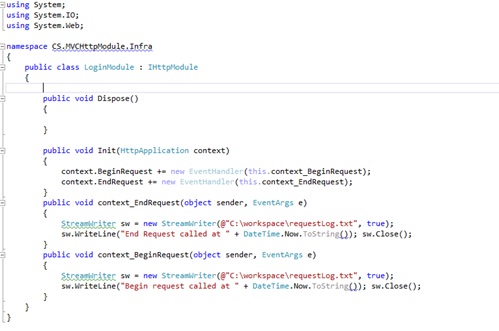
- Create a LoginModule Class
in your MVC Application. For creating HttpModule
we have implement IHttpModule interface which have two functions Dispose and
Init. We have implemented Init method here.

2. In ASP.NET we were registering HttpModule in Web.Config. We can
register module in MVC using Global.asax. Below is code

3. Add breakpoint in Application_start and Register and start
application. We can check module is loaded or not by checking HttpContext.Current.ApplicationInstance.Modules.AllKeys.


Comments
Post a Comment