Posts

How to convert a string with multiple comma separated values to rows in SQL Server

Let’s we have below table structure: create table Testdata ( SomeID int , OtherID int , Data varchar ( max ) ) This table contain below sample records insert Testdata select 1 , 9 , '18,20,22' insert Testdata select 2 , 8 , '17,19' insert Testdata select 3 , 7 , '13,19,20' insert Testdata select 4 , 6 , '' We want to get result like 1 9 18 1 9 20 1 9 22 2 8 17…. We can use below two options for this problem. Using function and table variable  CREATE FUNCTION dbo . Split (     @Line nvarchar ( MAX ),     @SplitOn nvarchar ( 5 ) = ',' ) RETURNS @RtnValue table (     Id INT NOT NULL IDENTITY ( 1 , 1 ) PRIMARY KEY CLUSTERED ,     Data nvarchar ( 100 ) NOT NULL ) AS BEGIN     IF @Line IS NULL RETURN     DECLARE @split_on_len INT = LEN ( @SplitOn )   ...

How to find Manager and Employee Level in SQL Server

Image
In this article we will see how CTE can be used to get manager information and its employee level. As CTE can be used in recursive and no-recursive queries. We will use recursive approach to get desired result 1. First create table with below structure IF OBJECT_ID('tEmployees', 'U') IS NOT NULL DROP TABLE dbo.tEmployees GO CREATE TABLE dbo.tEmployees (   EmployeeID int NOT NULL PRIMARY KEY,   FirstName varchar(50) NOT NULL,   LastName varchar(50) NOT NULL,   ManagerID int NULL ) GO 2. Insert some records into INSERT INTO tEmployees VALUES (101, 'Ken', 'Sánchez', NULL) INSERT INTO tEmployees VALUES (102, 'Terri', 'Duffy', 101) INSERT INTO tEmployees VALUES (103, 'Roberto', 'Tamburello', 101) INSERT INTO tEmployees VALUES (104, 'Rob', 'Walters', 102) INSERT INTO tEmployees VALUES (105, 'Gail', 'Erickson', 102) INSERT INTO tEmployees VALUES (106, 'Jossef', ...

Map Routes using Route Class in MVC

In MVC application, we can register routes in RouteCollection using RouteConfig . This RouteConfig is called using Application_Start of application. RouteConfig is configured as below routes.MapRoute(                 name: "Default" ,                 url: "{controller}/{action}/{id}" ,                 defaults: new { controller = "ProgramConfigEditor" , action = "Index" , id = UrlParameter .Optional }             ); We can register route of the application using Route Class as below. After creation of Route collection, it will move to MvcRouteHandler object. Route route = new Route ( "{controller}/{action}/{id}" ,           ...

How to Add HttpModule in MVC5 Application

Image
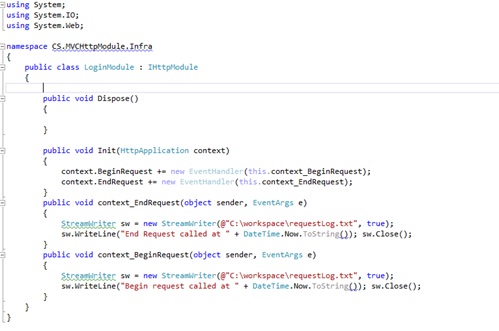
An HTTP module is an assembly that is called on every request made to your application. HTTP modules are called as part of the ASP.NET request pipeline and have access to life cycle events throughout the request. HTTP modules therefore give you the opportunity to examine incoming requests and take action based on the request. They also give you the opportunity to examine the outbound response and modify it. As MVC application is built over ASP.NET so we can create custom HttpModule in MVC application also. In this article we will create a simple HttpModule and register it in HttpApplication pipeline and verify that is loaded. Create a LoginModule Class in your MVC Application.   For creating HttpModule we have implement  IHttpModule interface which have two functions Dispose and Init. We have implemented Init method here. 2 .         In ASP.NET we were registering HttpModule in Web.Config. We can register module in MVC using Global.asax. Bel...

JavaScript Coding Guidelines

JavaScript Program Coding Guidelines: Always declare variable using var keyword, except when intentionally creating a global variable. //var name=”Dhanik”; Always use semicolons at the end of statement. So that when minification will be done there will no lose of functionality. Constants should be uppercase, with each word separated by an underscore. // var PI=2.147; Functions, variables, and method names all use camel case notation with the first letter lowercase. //var empFirstName=”Dhanik”; Classes and enum names also use camel case notation but with the first letter uppercase. There should be proper spacing between statements. Use tabs to indent code. Don’t use white spaces at the end of lines and empty lines should not have spaces either. Below example illustrates the preferred spacing. if ( name === “Dhanik” ) { methodCall( “see”, “our”, “spacing” ); } Use proper comments. ...